SindByte MCP SERVER
Model Context Protocol - Die Bruecke zwischen KI und Windows
Premium Local MCP Server
SindByte delivers 233 powerful tools and represents one of the most capable local MCP servers available. New: Dialog-LAB for multi-model conversations with thinking extraction, and Trading Hub supporting 12 cryptocurrency/stock exchanges. It emerged from the Smart Package Robot development. For those who need even more: The Smart Package Robot extends the concept with UserTools and TaskTools for commercial workflow automation.
Was ist ein MCP Server?
MCP (Model Context Protocol) ist ein offener Standard, der es KI-Systemen ermoeglicht, mit externen Tools und Datenquellen zu kommunizieren.
Stellen Sie sich vor: Lokale KI-Modelle wie LM Studio sind ein "Gehirn im Glas" - intelligent, aber eingesperrt. Sie koennen denken, aber nicht handeln. Sie haben keinen Zugriff auf Ihre Dateien, koennen keine Programme steuern und keine Aktionen auf Ihrem Computer ausfuehren.
Der SindByte MCP Server ist die fehlende Verbindung. Er stellt die "Haende und Augen" bereit, die Ihre KI braucht, um mit Windows zu interagieren - als sichere Bruecke zwischen Ihrem KI-Client und dem Betriebssystem.
Warum brauchen Sie einen MCP Server?
Befreien Sie Ihre KI
Ohne MCP kann KI nur reden. Mit SindByte kann sie Dateien lesen, Programme steuern und Workflows automatisieren.
Automatisieren Sie alles
Von der Dateiorganisation bis zur Desktop-Steuerung - 233 Tools fuer jeden Anwendungsfall.
Intelligente Workflows
IQ-Tools fuer bessere Entscheidungen, Timer fuer regelmaessige Aufgaben, alles lokal und sicher.
Wie funktioniert es?
1. Ihr KI-Client
LM Studio, Roo Code, VS Code oder jeder MCP-faehige Client
2. SindByte MCP
Empfaengt Befehle via HTTP (Port 5555) und fuehrt sie aus
3. Ihr Windows
Dateien, Programme, Services - alles unter Ihrer Kontrolle
Die 233 Tools im Ueberblick
FileTools (16 tools)
Complete filesystem manipulation with directory listing, file I/O, and archiving.
- GetDirectoryListing / List
- GetInfo / GetLines
- ReadFile / WriteFile / Append
- Delete / Move / CreateDirectory
- FindText
- Zip / Unzip
SystemTools (21 tools)
Deep OS integration with process management, services, registry, and shell execution.
- ListProcesses / ExecuteCommand
- Service Start/Stop/Restart/List
- Registry Read/Write/Delete
- RunPowerShell / RunBatchFile
- ListRegistrySubKeys / ListRegistryValues
MathTools (11 tools)
Scientific calculation engine with formulas, conversions, and optimization.
- ResolveFormula (Trig, Log, Exp)
- Unit Conversions (m to ft, C to F)
- Integrate / RootFinder
- MonteCarlo / Optimizer
- LoopCalc / SmartSequence
MemoryTools (12 tools)
Short & long term retention with clipboard and file integration.
- Store / Recall / ListKeys
- FromFile / ToFile
- FromClipboard / ToClipboard
- GetLines
- JSON_Escape / JSON_Unescape
- Delete / Format
DataTools (20 tools)
Text processing, JSON/CSV conversion, and regex operations.
- SortList / Split / Join
- RegexSearch / RegexReplace
- CsvToJson / JsonToCsv
- TableToJson / JsonSelect
- FindText / GetInfo / GetLines
- ParseKeyValue / Replace
ClipboardTools (4 tools)
Direct interaction with the Windows clipboard.
- Read / Write
TextTools (2 tools)
Text analysis utilities for character and word statistics.
- CountChars
- CountWords
TimerTools (7 tools)
Scheduled task execution with persistent timer management.
- SetTimer / UpdateTimer
- ListTimers / GetTimer
- FindTimer
- ClearTimer
Advanced Capabilities
IQTools (18 strategies)
Multi-provider AI orchestration with LM-Studio and OpenAI support.
- ChainOfThought / TreeOfThought
- ExpertPanel / MultiVote / Ensemble
- Debate / RedTeam / SelfCritique
- Socratic / CrossResolve
- OpenAI Transcription (voice-to-prompt)
CUTools (17 tools)
Computer Use automation - GUI interaction, screenshots, and window control.
- Screenshot (full/partial/window)
- MouseClick / SimKeyPress
- GetWindowState / SetWindowState
- ListWindows / LocateAppWindow
- PictureResize / PictureConvert
Dialog-LAB (NEW)
Multi-model conversation laboratory with thinking extraction.
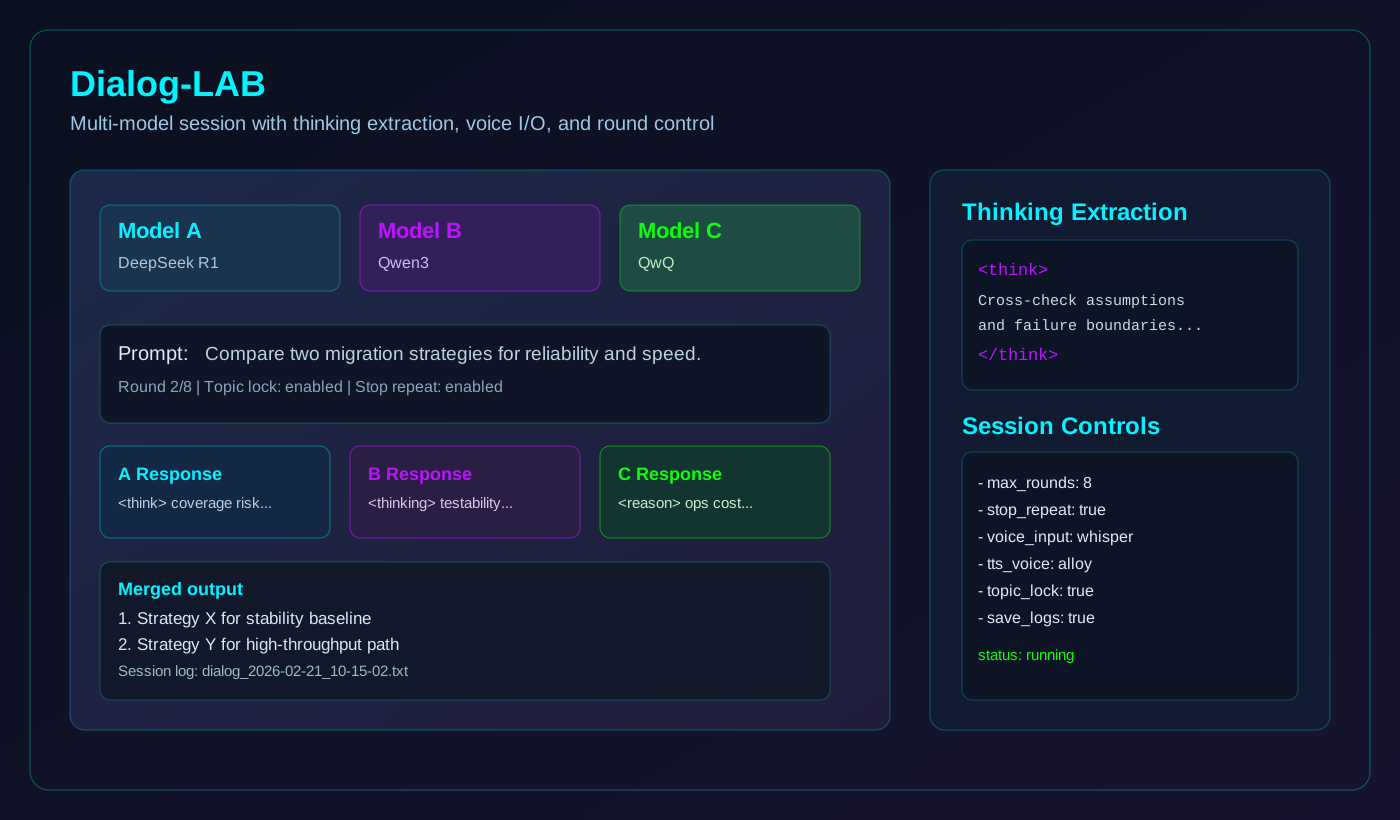
- Multi-model conversations (A/B/C)
- Thinking extraction from responses
- Supports <think>, <thinking>, <reason> tags
- Text-to-speech with voice selection
- Voice input transcription
- Conversation logging to file
Trading Hub (NEW)
Multi-venue cryptocurrency and stock trading integration.
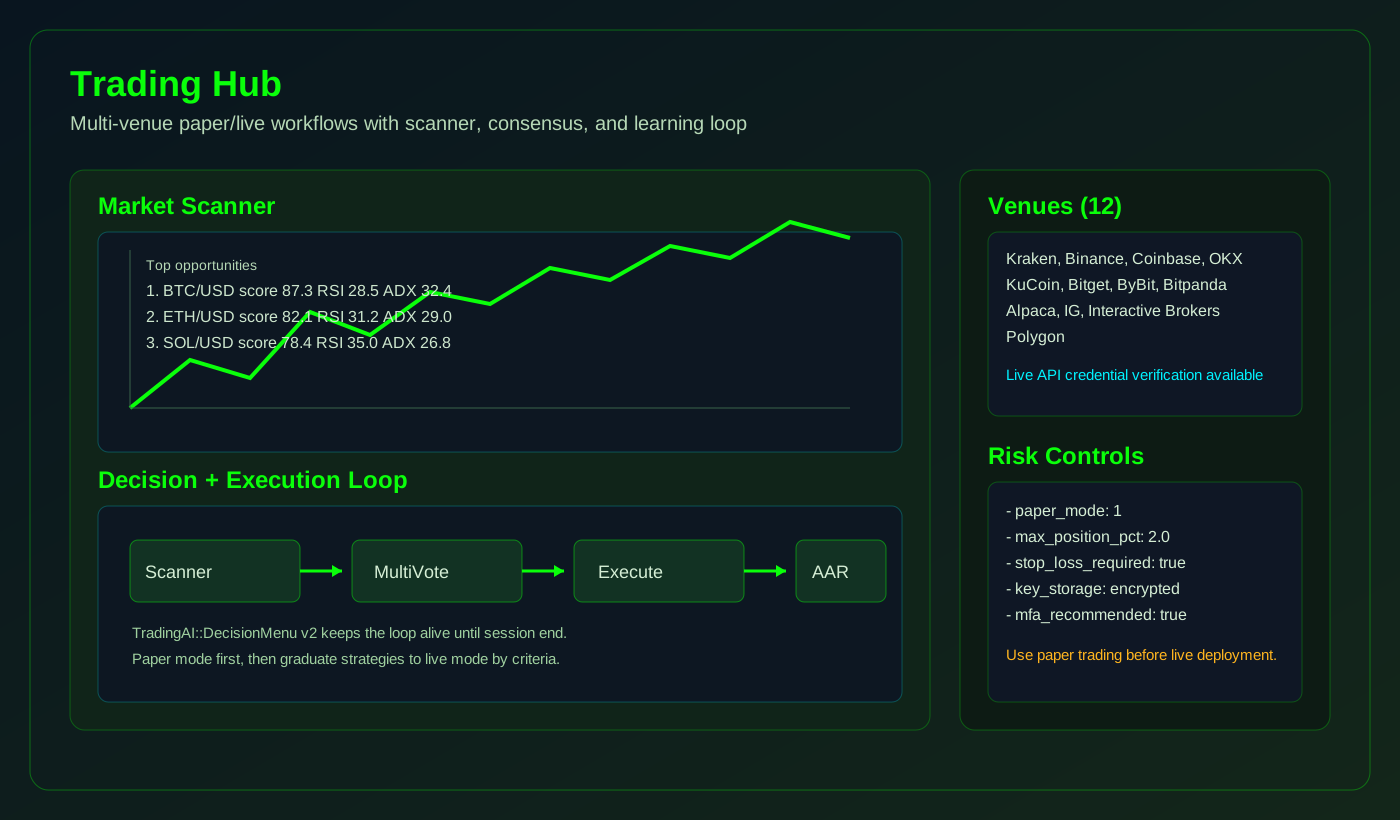
- 12 Trading Venues Supported
- Live API Credential Verification
- Encrypted Key Storage
- Automated Trading Profiles
- Trading Academy Integration
Web & Cloud Integration
WebTools (5 tools)
HTTP client capabilities with search integration.
- FetchText / FetchMany / FetchHeaders
- Search (Serper API integration)
- ExtractText (HTML parsing)
TaskTools (5 tools)
Task lifecycle management for creating, tracking, and maintaining tasks.
- CreateTask / UpdateTask
- ListTasks / GetTask
- DeleteTask
Disabled by default - enable via mcp_config.json
Dialog-LAB: Thinking Extraction
Thinking Extraction (built into Dialog-LAB)
The Dialog-LAB automatically extracts and displays reasoning/thinking content from AI model responses. These SPR commands are available for scripting within the Dialog-LAB interface.
LMS.THK
SPR command to extract thinking content from model responses. Supports <think>, <thinking>, <reason>, <analysis>, <ponder>, <cogitate> tags.
LMS.THS
SPR command to strip thinking blocks from responses. Returns clean text without reasoning content.
LMS.HTK
SPR command to check if response contains thinking blocks. Returns count of thinking sections found.
Security & Key Storage
MCP_Key_Storage.inc v2.1
Encrypted API key storage with optional PC-binding. Protects sensitive credentials like OpenAI API keys, Kraken trading credentials, and service authentication tokens.
STRICT Mode (Default)
- PC-bound encryption
- Keys only work on original PC
- Maximum security
MOBILE Mode
- Portable encryption
- Move keys between computers
- Still encrypted at rest
Deployment Protocols
Protocol: LM-Studio
Target: Local LLM Interface.
- Start
MCP-Server 1.exe - Open LM-Studio -> Chat Interface.
- Click "Install/Configure" MCP.
- Edit
mcp.jsonand append:
"mcpServers": {
  "sindbyte-mcp": {
    "url": "http://127.0.0.1:5555/mcp"
  }
}
Protocol: Roo-Code / Cline
Target: VS Code Agent.
- Start
MCP-Server 1.exe - Open VS Code -> Roo Code Extension.
- Select "Edit Global MCP Settings".
- Insert configuration:
"mcpServers": {
  "sindbyte-mcp": {
    "type": "streamable-http",
    "url": "http://127.0.0.1:5555/mcp"
  }
}
Authorization & Licensing
Free for private, non-commercial use.
For commercial deployment, a license fee (approx. $9 per seat) applies.
This ensures continued development of the SindByte ecosystem.
Developer's Note: This server is a by-product of the commercial Smart Package Robot. SPR owners can define custom "Usertools::" for unlimited extensibility.
Trust & Transparency
Free
No cost for non-commercial use. No hidden fees.
No Spyware
No data collection, no telemetry, no phone-home.
No Ads
No popups, no banners, no annoying promotions.
No Unwanted Install
No toolbar, no adware, no background installers.